
Overview
Embedded Tokenization is used when the card data is sent between the browser and gateway using JavaScript.
All card data is sent between the browser and the gateway, keeping your server outside scope. The registration platform’s web server never comes into contact with the card and therefore is fully protected and outside of PCI scope. It is compatible with data vaults to fully protect card holder information. Because of this, it is the recommended integration method.
It begins with receiving a One-Time Token - OTT which is completed through loading InterPay JavaScript. The One-Time Token can then be used to complete a Direct Payment transaction. Each Direct Payment transaction returns a “permanent” token, which can then be stored and reused for subsequent transactions for that card.
Embedded Tokenization allows the registration platform to keep the customer on their page, having complete control of the user experience, payment flow, and UI/UX.
Sequence
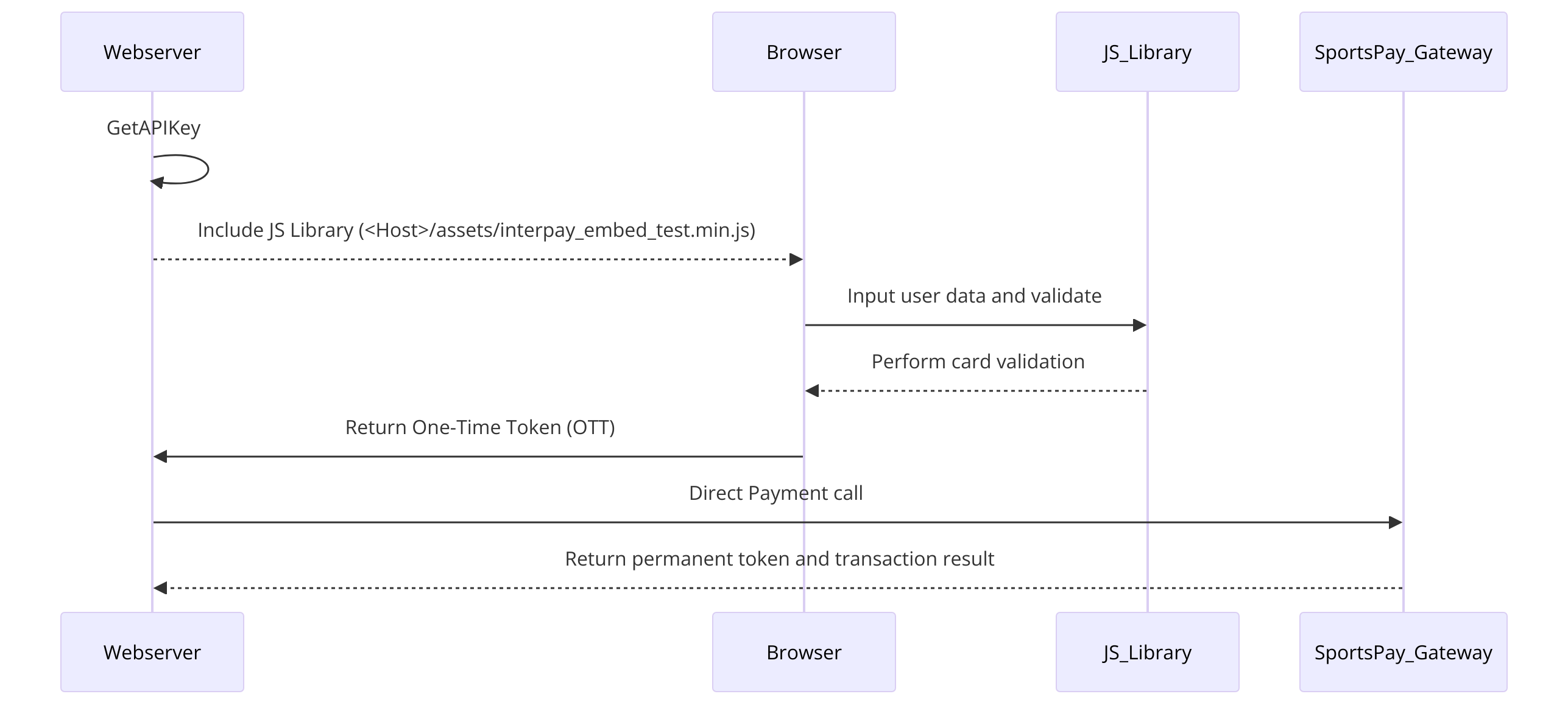
The overall sequence of the Embedded Payment Method is as follows:
- Your server calls GetAPIKey to obtain a one-time API key
- Your server builds the payment page, loading the InterPay JavaScript library:
<Host>/assets/interpay_embed.min.js - The customer enters their card details on your page
- Your page calls
Interpay.Tokenize(), which validates the card data and sends it directly to the gateway — your server never touches the card number - The gateway returns a One-Time Token - OTT to the browser via callback
- The browser passes the OTT to your server
- Your server submits a Direct Payment request using the OTT within 10 minutes
- The gateway processes the transaction and returns a permanent token in the response
- Store the permanent token against the customer's profile for future use (recurring payments, refunds, saved cards)
Example Code
Production JS filename will be different than the one shared below
<html>
<head>
    <meta http-equiv="content-type" content="text/html; charset=UTF-8">
    <title>Checkout.js Demo</title>
    <script src="https://ajax.googleapis.com/ajax/libs/jquery/3.4.1/jquery.min.js"></script>
    <!-- //on server side, call GetAPIKey before building page
    //GetAPIKey responds HOST, APIKEY, and USERFEE -->
    <script>
        document.addEventListener("DOMContentLoaded", function() {
            //create a url to load JS dynamically
            const url = HOST+"/assets/interpay_embed_test.min.js";//production JS filename will be different

            const displayResult = (response) => {
                //the successful response will be in the following format
                showResult(response);
            };

            //load JS file dynamically
            var scriptEle = document.createElement("script");
            scriptEle.setAttribute("src", url);
            document.head.appendChild(scriptEle);

        });

        async function pay() {
            //build the cardData from your inputs
            var cardNum = document.getElementById('cardNum').value;
            var expMM = document.getElementById('expMM').value;
            var expYYYY = document.getElementById('expYY').value;
            var cvv = document.getElementById('cvv').value;
            var cardData = {
                CARDNUM: cardNum,
                CARDEXPMM: expMM,
                CARDEXPYYYY: expYYYY,
                CARDCVV: cvv
            };
            var interpay = new InterPay();
            //without callback
            //check below commented code with callback
            var respValidate = interpay.validate(apiKey, cardData);
            if (respValidate.datavalid){
                var respData = await interpay.tokenize(host, apiKey, cardData);
                displayResult(respData);
            }
            else{
                displayResult(respValidate);
            }
            //with callback
            // var respValidate = interpay.validate(apiKey, cardData);
            // if (respValidate.datavalid){
            //     await interpay.tokenize(host, apiKey, cardData, displayResult);
            // }
            // else{
            //     displayResult(respValidate);
            // }
            return false;
        }
        function showResult(response) {
            document.getElementById('txn_status').innerHTML = "<b>" + response.text + "</b>";
            document.getElementById('txn_response').innerHTML = JSON.stringify(response);
        }

    </script>
</head>
<body>
    <input name="host" id="host" type="hidden" value="">
    <input name="apiKey" id="apiKey" type="hidden" value="">
    <label>Amount: $100</label>
    <label>Processing Charge: $3.10</label>
    <label>Total: $103.10</label>

    Card Number: <input id="cardNum" type="text" name="cardNum" value="" /> <br />
    Expiry Month: <select name="expMM" id="expMM">
                    <option value="01">January</option>
                    <option value="02">February</option>
                    <option value="03">March</option>
                    <option value="04">April</option>
                    <option value="05">May</option>
                    <option value="06">June</option>
                    <option value="07">July</option>
                    <option value="08">August</option>
                    <option value="09">September</option>
                    <option value="10">October</option>
                    <option value="11">November</option>
                    <option value="12" selected>December</option>
                </select> <br />
    Expiry Year: <select name="expYY" id="expYY">
                    <option value="2027">2027/option>
                    <option value="2028">2028</option>
                    <option value="2029" selected>2029</option>
                    <option value="2030">2030</option>
                    <option value="2031">2031</option>
                </select> <br />
    CVV2: <input id="cvv" type="text" name="cvv" value=""> <br />

    <button onclick="return pay();">Process Payment</button>
    <br>
    <br>
    <br>
    <br>
    Transaction Status:<div id="txn_status"></div>
    <br>
    Transaction Response:<div id="txn_response"></div>
</body>
</html>
Updated about 22 hours ago