
Overview
Platform Billing lets your registration platform collect its own fees on top of (or alongside) merchant transactions. The amount you collect from Platform Billing is deposited to your bank account and is not shared with SportsPay.
There are two ways to charge a Platform fee:
- Platform Fee (
PLATFEE) — added on top of the transaction amount. The cardholder pays.
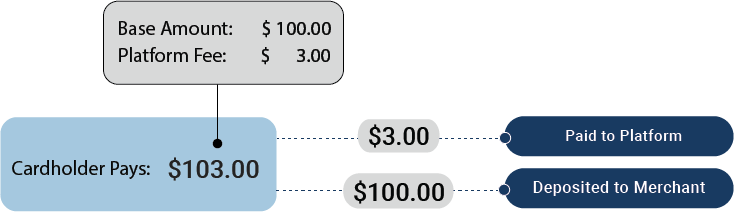
- Platform Charge (
PLATCHRG) — subtracted from the approved transaction amount. The merchant pays.
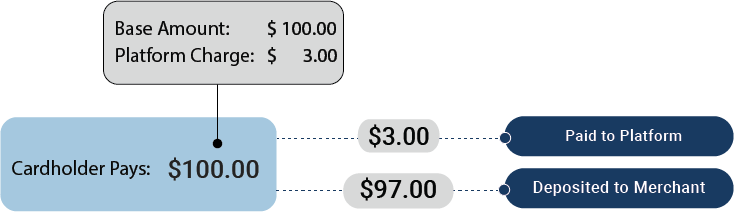
A single transaction can have either a Platform Fee or a Platform Charge, but not both. Either can be combined with CustomerPay (USERFEE).
Choosing Between Fee and Charge
| Platform Fee | Platform Charge | |
|---|---|---|
| Field | PLATFEE | PLATCHRG |
| Who pays | Cardholder | Merchant |
| Effect on the cardholder's total | Increases (AMT + PLATFEE) | None — they pay AMT |
| Effect on the merchant's deposit | None — they receive AMT | Decreases (AMT − PLATCHRG) |
| Best for | Visible service fees passed to the registrant | Revenue share or platform commissions transparent to the cardholder |
How to Charge a Platform Fee or Charge
The mechanics differ slightly between integration methods.
Direct with Embedded Tokenization
Include PLATFEE or PLATCHRG directly on the Sale (or Force Post, Pre-Auth, Completion) request. Use dollars-and-cents format.
curl --request POST --url {gateway_endpoint}/ \
  --header 'Content-Type: application/json' \
  --data '{
    "TERMID":   "your_termid",
    "PASS":     "your_pass",
    "TYPE":     "S",
    "AMT":      "125.00",
    "PLATFEE":  "5.00",
    "REF":      "reg-20260412-001",
    "TOKEN":    "4xxxxxxxxxxx1111",
    "JSON":     "Y"
  }'
The cardholder is charged AMT + PLATFEE = $130.00. The merchant receives AMT = $125.00. The platform receives PLATFEE = $5.00.
Customized Checkout and Embedded Components
You can pass PLATFEE or PLATCHRG directly on StartSession like Direct, or use the universal PLATFORM field and let the gateway decide.
When you send PLATFORM, the gateway looks at the merchant's pricing model:
- If the merchant is CustomerPay-enabled,
PLATFORMis applied as aPLATFEE(cardholder pays). - Otherwise,
PLATFORMis applied as aPLATCHRG(merchant pays).
This is useful when you want the fee to behave consistently across your merchant base regardless of whether each merchant is enrolled in CustomerPay.
curl --request POST --url {gateway_endpoint}/ \
  --header 'Content-Type: application/json' \
  --data '{
    "TERMID":   "your_termid",
    "PASS":     "your_pass",
    "TYPE":     "W",
    "ACTION":   "StartSession",
    "AMT":      "125.00",
    "PLATFORM": "5.00",
    "CUSTEMAIL":"[email protected]",
    "REQUESTID":"20260412001",
    "JSON":     "Y"
  }'
Note: Send exactly one of
PLATFORM,PLATFEEorPLATCHRG
Refunds
Platform Fees are not refundable. PLATFEE is not accepted on a Refund (TYPE=R); refund the base amount only.
Platform Charges are not returned automatically. To credit the merchant for a Platform Charge that was withheld, include PLATCHRG on the refund. You can return all or part of the original charge.
Examples:
- Sale:
AMT=125.00,PLATFEE=5.00→ cardholder paid$130.00, merchant got$125.00, you got$5.00. - Refund:
AMT=125.00→ cardholder refunded$125.00, you keep the$5.00.
Or:
- Sale:
AMT=125.00,PLATCHRG=5.00→ cardholder paid$125.00, merchant got$120.00, you got$5.00. - Refund:
AMT=125.00,PLATCHRG=5.00→ cardholder refunded$125.00, merchant credited$5.00, you give back$5.00.
Enabling Platform Billing on a Terminal
Platform Billing is enabled per merchant terminal:
ENABLE PLAT FEEmust be set on the terminal to allowPLATFEErequests.ENABLE PLAT CHRGmust be set on the terminal to allowPLATCHRGrequests.
These settings are configured by SportsPay during onboarding. Partners with questions about enabling Platform Billing on a merchant's terminal can email [email protected].
Combining with CustomerPay
Platform Billing and CustomerPay can be charged on the same transaction:
{
  "AMT":     "125.00",
  "USERFEE": "0.80",
  "PLATFEE": "5.00"
}
The cardholder is charged AMT + USERFEE + PLATFEE = $130.80. The merchant receives AMT = $125.00. SportsPay collects USERFEE. Your platform collects PLATFEE.
See CustomerPay for the full CustomerPay contract.
API Reference
For the full field reference, see the API Reference for the transaction type you're using:
- Direct with Embedded Tokenization — Sale, Force Post, Pre-Auth, Completion, Refund API References
- Customized Checkout and Embedded Components — StartSession API Reference
Updated 11 days ago